See every table.Turn every minute.

TableWave turns the cameras you already have into a live map of your floor. Your team gets a tap on the wrist when a table needs them. You see what slow service is costing you, tonight.

Dining room
Friday 20:18
Illustrative simulation
Top-down plan of a dining room with 13 tables, each coloured by its stateBanquetteThe passBarHost standBus stationT134:00T2T34:00T412:00T541:00T6T726:00T86:00T918:00T1052:00T11T128:00T13
Money on the floor tonight
$214.40
Since 17:00. Rising $3.20 a minute now: 2 tables waiting at $1.60 per table-minute.
Free3
Seated7
Waiting2
  • Installed in a daySet up on site, before dinner.
  • Your camerasNothing new on the ceiling.
  • A person who shows upWe install and train in person.

Works with the cameras you already have

  • Hikvision
  • Dahua
  • Reolink
  • UniFi Protect
  • Axis
  • TP-Link Tapo
  • EZVIZ
  • Lorex
  • Amcrest
  • Any ONVIF camera
Friday, 20:12

The blind spot

Table 8 sat down nine minutes ago and nobody has been over. Your server is buried at the bar, the host is seating a walk-in, and you're on the pass. Nobody did anything wrong. Nobody could see it.

  • A table that waits for its first visit orders less and turns later.
  • A dirty table you can't see is a table you can't seat.
  • On a full Friday, those minutes add up to real money.

Same Friday, with TableWave

The room lights up

Every table shows its state on the host screen. At five minutes without a visit, Table 8 buzzes one person: Ana, because it's her section. Not the whole team, not the manager. When she reaches the table, the alert closes itself.

  • Screen first, buzz second. The host stand does most of the work.
  • One person per alert. It goes to the manager only if nobody responds.
  • The first nights run quietly while we tune the timings to your floor.
Day 14

Proof, in your own numbers

After two weeks you get a payback report: how fast tables were reset, how soon guests saw a server, how many more tables you sat, and what that's worth at your average check. If the numbers don't add up, you don't continue past the free pilot.

  • Week one is your baseline. Week two is with alerts on.
  • Every estimate shows its formula, so your accountant can check it.
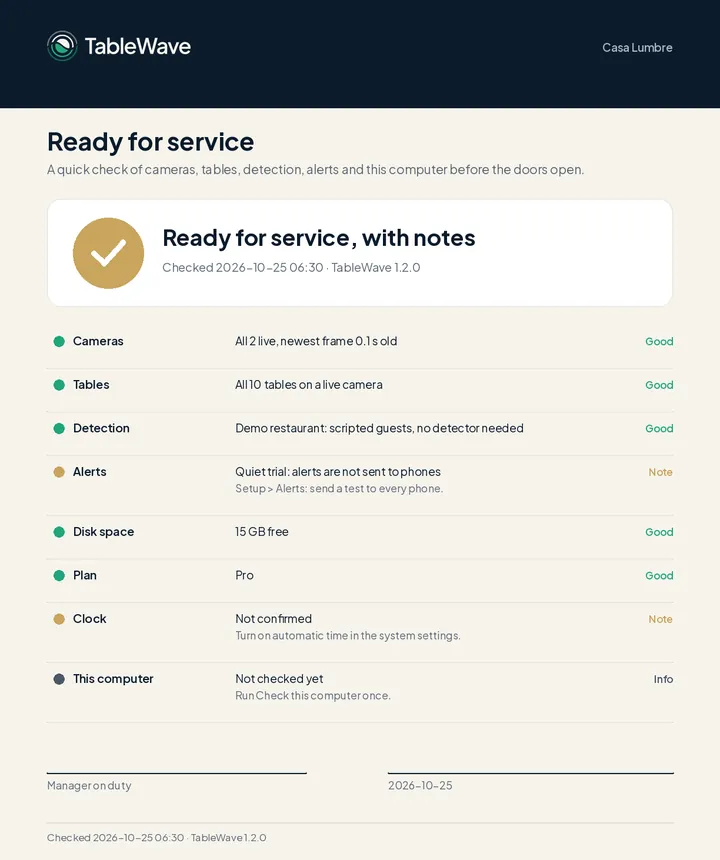
  • A ready-for-service self-test checks cameras and alerts before you open.
Install day

Live by dinner

We come to you. We connect to the cameras already on your ceiling, set up a small computer in the building, draw your tables and test everything before service.

  • Your own PC, if it passes our 60-second check. If not, our locked-down box is included.
  • Nothing is installed on your POS. Nothing to learn for your team.
Every frame

Tables, not people

TableWave sees a body at a table, not who it is. Faces are blurred on screen. We keep table events, like “seated at 20:14”. Clip recording stays off unless you switch it on. Video is processed on a computer inside your restaurant and is not uploaded or stored by TableWave.

Dining room, Friday 20:12Illustrative
Top-down plan of a dining room with 13 tables, each coloured by its stateBanquetteThe passBarHost standBus stationT122:00T2T36:00T415:00T538:00T6T731:00T89:00T912:00T1047:00T11T1219:00T13
Lost tonight while nobody saw
$0
Table 8 waiting0:00
TableWaveDemo restaurant

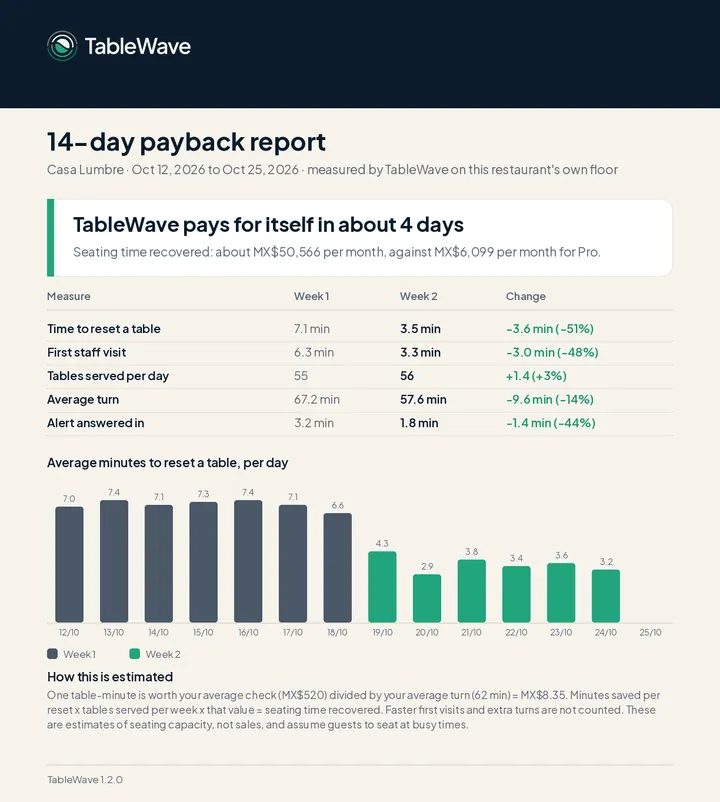
14-day payback report

Measured on the restaurant’s own floor. Illustrative demo data.
Setup and first month covered in about 33 daysEstimate: seating time recovered, against Pro setup plus the first month
Week 1Week 2, alerts onMinutes to reset a table, per day
Time to reset7.1 → 3.5 min
First visit6.3 → 3.3 min
Average turn67 → 58 min
Ready for
service
10:00

Your cameras

We connect over your network. Any RTSP or ONVIF camera works.

HikvisionDahuaReolinkUniFiTapo
13:00

Your PC or our box

A computer in the building runs it all. It keeps working if the internet drops.

18:00

Live by dinner

Tables drawn, staff phones paired, first seating on the map.

Ready for serviceCameras, tables, alerts and the computer all checked
CAM 0220:14:07
Kept20:14Table 4 seated
No facial recognition
Faces blurred on screen
Clips off by default
Processed on site

Six table states your team reads at a glance

The host screen shows all of them, silently. Only the states that need someone send a buzz, and only to the person who covers that table. Starter shows the first five; Long sit comes with Pro and Multi-Location.

Available

Clean and empty.

What happensShown at the host stand as the next table to seat.

Occupied

Guests seated.

What happensThe turn timer starts.

Needs attention

Seated, and no staff visit in 5 minutes. You set the limit.

What happensThe server for that section gets a tap on the watch.

Needs cleaning

Guests left, table not reset.

What happensThe busser on shift gets the alert.

Reserved

Held for a booking.

What happensHidden from walk-ins on the host screen.

Long sitPro · manager only

Seated well past the usual turn for that party size.

What happensA quiet nudge to the manager. Never shown to guests.

What is your floor leaking?

Set the sliders to a normal week. We only count minutes when guests are waiting for a table, so the number stays honest.

From guests leaving to the table being ready again.
Assumptions you can change
Our demo restaurant reached 3.5. Set your own.
Minutes only count when someone is waiting to be seated.
TableWaveYour estimate
One table-minute is worth
Minutes saved per reset
Tables reset per month
Counted while guests wait
Leaking each month0
Compare with

One table-minute = (average check per guest × guests per table) ÷ average turn. Resets per month = tables × resets per table per night × nights open. Leak = resets × minutes saved × share of service with a wait × table-minute. Payback counts the setup fee plus the first month. An estimate of seating capacity, not guaranteed sales.

Book a free 30-day pilot

Bring this number. We’ll measure the real one on your floor.

Built for the middle of a Friday rush

Real TableWave screens, running on demo data. Numbers are illustrative.

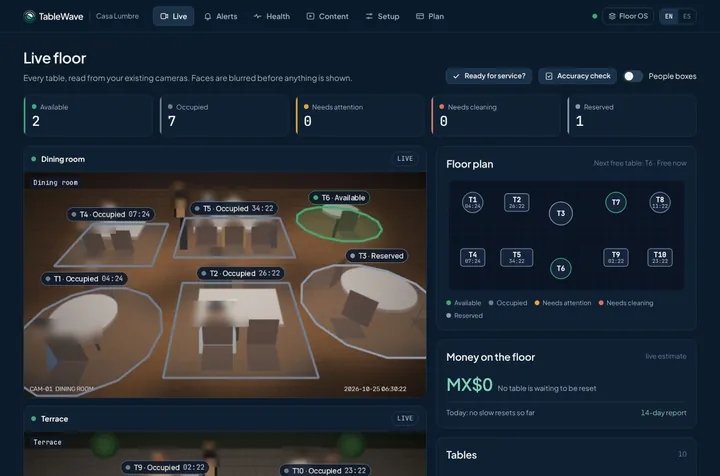
TableWave live floor screen: camera views with each table labelled by state, a floor plan and the money on the floor estimate

Every table, from your cameras

The manager view: camera feeds with tables outlined, a floor plan, and money on the floor in your currency.

  • Faces blurred on screen
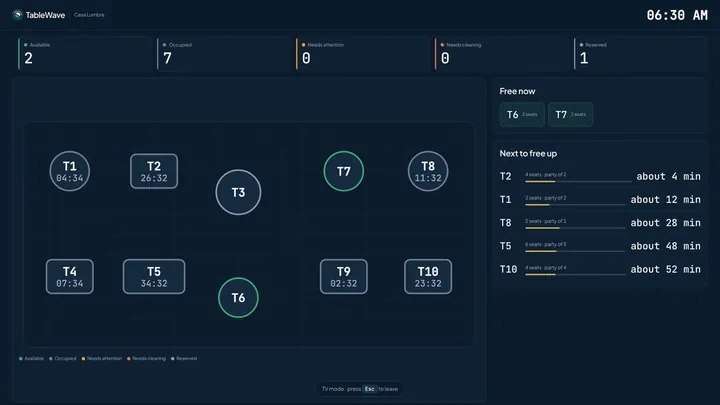
  • Next free table predicted for the host (Pro)
  • Runs on the computer in your restaurant
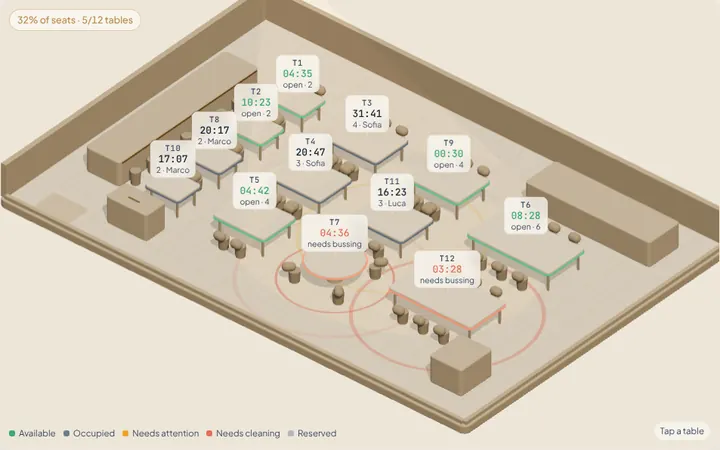
3D view of the demo restaurant floor in TableWave Floor OS

Walk the floor yourself

A demo restaurant in 3D with simulated service. Tap any table, or speed up a Friday rush. Loads about 1 MB.

Open full screen

What the 14-day report measures

These are our demo restaurant’s numbers, to show the format. They are illustrative, not a customer result. Yours come from your own floor.

3.5min
from 7.1

Time to reset a table

Guests leave, busser gets the alert, table is ready.

3.3min
from 6.3

First staff visit

From sitting down to a server at the table.

58min
from 67

Average turn

Shorter turns mean more tables on a full night.

1.8min
from 3.2

Alert answered in

How fast the right person responds.

Nothing to learn

The host screen is colours on a floor plan. Training fits in one pre-shift.

Works offline

Everything runs on the computer in your restaurant. Only phone alerts need internet.

Quiet first nights

Alerts are logged, not sent, until the timings fit your floor.

A person who shows up

We install, train your team, and come back if something is off.

Start with a free 30-day pilot. Monthly after that: cancel any time with 30 days’ notice.

Ten founding restaurants per city

We’re choosing our first ten partners in each city. They get the best price we will ever offer. We get a case study and two introductions.

  • Half off setup
  • Your monthly price locked for 24 months
  • In return: a short case study with your real numbers, and introductions to two owners you know
Apply for a founding seat
Mexico City10 of 10 open
Austin10 of 10 open
Miami10 of 10 open
Dubai10 of 10 open

Seats are released one at a time, as each pilot starts.

Questions owners ask us

Something else on your mind? Write to [email protected].

Do I need new cameras?

No. If your cameras can send an RTSP stream, TableWave can read them. That covers nearly every IP camera and recorder sold in the last ten years, including Hikvision, Dahua, Reolink, UniFi, Axis, Tapo and EZVIZ, plus anything ONVIF. We only need 640×360 at two frames a second. Cloud-only cameras like Ring, Nest or Arlo don’t stream locally, so we add one camera of about $30 per zone.

Do I have to buy hardware?

No. If your computer passes our 60-second check, we install on it. It has to stay on, be wired to the camera network, and not be your POS terminal. If it doesn’t pass, our locked-down TableWave box is included in setup.

Is this facial recognition?

No. TableWave detects people as anonymous shapes at tables. No face matching, no face templates, no identity, no tracking across visits. Faces are blurred on screen: the blur is applied to every person the system detects. We keep table events. Clip recording is off unless you switch it on, and clips delete themselves after 30 days.

Is it spying on my staff?

It watches tables, not people. No facial recognition, no identities, no per-employee scores. Alerts go to whoever covers the table. We give you a written staff notice to share before go-live.

Will phones buzz all night?

No. The host screen shows every table silently. Only a table that needs someone buzzes one person, once, and the alert clears itself when they reach the table. There’s a cap on buzzes per person per hour, and the first nights run in quiet mode.

How accurate is it?

We measure it in your own restaurant during the proof week. The accuracy check scores TableWave against what really happened on your floor, and you see the result before you pay. We don’t quote a general accuracy figure: lighting, camera angles and layouts differ too much between restaurants.

What if the internet goes down?

It keeps working. Everything runs on the computer in your restaurant. Only phone and watch alerts need internet; the host screen doesn’t.

Does it connect to my POS?

It doesn’t need to: it reads the floor from cameras. Reports use your average check today. Connections for Toast and Square are on our roadmap, so reports can use your real check totals.

We’re a small place with 8 tables.

Starter covers up to 4 cameras, and one well-placed camera often covers 8 tables.

We tried tech before and nobody used it.

There’s nothing to learn: the host screen is colours on a floor plan. And we come in person to install and train your team.

Is there a long contract?

No. A free 30-day pilot first, then monthly: cancel any time with 30 days’ written notice, effective at the end of that billing period, with no early-termination fee. The setup fee is non-refundable once we have installed. Paying a year upfront is optional and gets you 12 months for the price of 10.

What about my guests’ privacy?

No facial recognition, no identities, and a clear notice at the door (we supply it). Video is processed on the computer in your building and is not uploaded or stored by TableWave.

Your floor is already talking.Start listening this week.

A free 30-day pilot, installed in person, on the cameras you already have.

No new camerasMonthly, 30 days’ notice to cancelVideo processed in your building